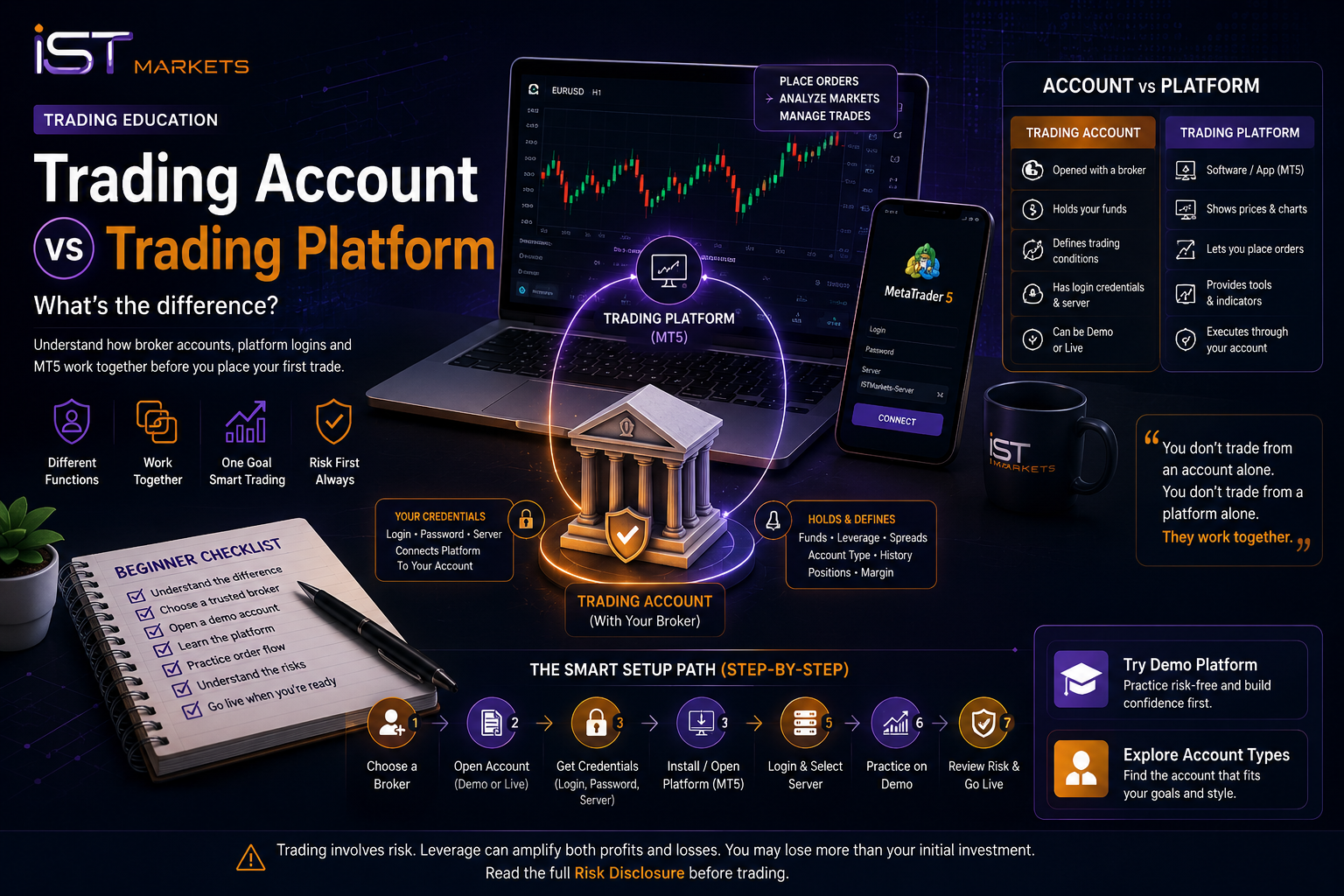
Trading Account vs Trading Platform: Broker Account, MT5 Login and Setup Explained
A practical beginner guide explaining how a broker, trading account, client portal, MT5 login, platform server, demo account and live account work together before placing your first order.
Quick Answer: Account vs platform in one minute
A trading account is the account you open with a broker. It holds your account type, balance, trading conditions, demo or live status, and platform credentials. A trading platform is the software or app you use to view prices, analyse charts, place orders and manage trades. You do not trade from an account alone, and you do not trade from a platform alone. Trading happens when the platform is connected to the correct broker account using the right login, password and server details.
Risk reminder before reading
Source Snapshot
This guide is designed to reduce setup confusion for new traders. It explains the practical path from broker registration to account creation, credentials, MT5 platform login, demo practice and live-readiness review. Platform references are aligned with MetaTrader 5 documentation, while risk language follows IST Markets’ risk disclosure principles.
Content Table
1Account vs platform table
The difference at a glance.
2What each part does
Broker, account, platform and demo.
3Portal login vs MT5 login
The login confusion beginners face.
4Beginner setup flow
Broker → account → platform → practice.
5What a trading account does
Account type, credentials and conditions.
6What a trading platform does
Charts, orders and execution access.
7Common setup mistakes
Avoid account and platform confusion.
8Beginner setup checklist
A simple path before live funding.
Trading account vs trading platform: side-by-side comparison
The easiest way to understand the difference is to separate the trading relationship from the trading interface. Your trading account is created with the broker. Your trading platform is the tool that connects to that account so you can view markets and send orders.
| Point of comparison | Trading account | Trading platform |
|---|---|---|
| Basic meaning | The account opened with a broker. | The software or app used to view charts and place orders. |
| Main purpose | Holds account type, demo/live status, credentials, balance and trading conditions. | Displays prices, charts, orders, positions, history and trading tools. |
| Created by | The broker after registration, demo setup or live account opening. | The platform provider or broker-supported platform environment. |
| Examples | Demo account, live account, standard account, premium account. | MT5 desktop, MT5 mobile, web platform, broker-supported trading app. |
| Login details | Account number or login, password and server details. | Uses those credentials to connect to the correct account. |
| Main beginner risk | Choosing or funding an account before understanding the terms. | Confusing platform access with trading readiness. |
Simple way to remember it
What each part does — and what it does not do
Beginners often get confused because broker, account and platform appear in the same setup process. But each part has a different job. Understanding what each one does — and what it does not do — prevents a lot of setup mistakes.
| Part | What it does | What it does not do |
|---|---|---|
| Broker | Provides the account environment, access, trading conditions and execution relationship. | Does not guarantee trading results or remove market risk. |
| Trading account | Holds your demo/live status, balance, credentials and account conditions. | Is not the charting software itself. |
| Trading platform | Shows charts, prices, order tickets, positions and trade management tools. | Does not create the broker account or make trading low-risk. |
| Demo account | Helps you practise platform workflow with virtual funds. | Does not prove future live performance. |
| Live account | Uses real funds and reflects live account conditions. | Should not be funded only because the platform feels easy to use. |
Client portal login vs trading account login vs MT5 login
One of the biggest beginner pain points is login confusion. A trader may register with a broker, open a client portal, receive account credentials, download MT5, and then wonder why one login does not work everywhere.
The reason is simple: not all logins serve the same purpose.
| Login type | What it is for | Common beginner confusion |
|---|---|---|
| Client portal login | Used to manage profile, verification, deposits, withdrawals, account settings and documents. | Thinking it is always the same login used for MT5. |
| Trading account login | Used to identify a specific demo or live trading account. | Using demo credentials while thinking the account is live, or the reverse. |
| MT5 platform login and server | Used to connect the MT5 platform to the correct broker server and trading account. | Entering the right login on the wrong server, then assuming the platform is broken. |
Practical login rule
Beginner setup flow: broker to account to platform
The best setup order for most beginners is not “download first, understand later.” A cleaner path is to understand the broker environment, create the correct account, then connect the platform with the right credentials.
Recommended beginner setup path
Review provider, documents and risk disclosure.
Open demo or choose suitable account type.
Save login, password and server securely.
Connect MT5 or supported platform.
Practise order flow before live funding.
Review margin, costs, execution and possible loss.
Here is a simple example. A beginner opens a demo account with a broker. The broker provides demo login credentials and server details. The trader opens MT5, chooses the correct broker server, enters the demo credentials, and confirms that the platform shows the correct demo account.
After that, the trader practises viewing prices, placing a market order, setting a stop loss, modifying an order and closing a position. This is platform practice. It is useful, but it is not the same as being ready to trade live.
What a trading account does
A trading account is the account you open through a broker. It can be a demo account for practice or a live account for real-money trading. It is connected to your account type, account currency, trading conditions, verification status, funding method, login credentials and applicable legal documents.
For beginners, the trading account is the starting point because it defines the environment the platform will connect to. The account may determine available instruments, account conditions, possible leverage, margin requirements, minimum trade size and whether the environment is demo or live.
A trading account type should not be chosen only because it sounds advanced. Beginners should compare the account conditions, understand the costs, and decide whether they are still in practice mode or ready to review live-account requirements.
Account-first thinking
What a trading platform does
A trading platform is the software or app used to see market prices, open charts, analyse instruments, place orders, modify trades, monitor positions and review account activity. MT5 is a well-known platform environment used for market access, chart analysis, trading operations, mobile access and order management.
The platform does not replace the broker account. It needs the right credentials to connect to the account. Those credentials normally include a login, password and server or broker selection. Without the correct account connection, the platform may open, but it will not show the intended account properly.
A trading platform can make the workflow easier, but beginners should avoid confusing ease of access with readiness. Being able to click “buy” or “sell” does not mean the trader understands order type, spread, margin, lot size, swap, execution or stop-loss limitations.
Is MT5 a broker?
No. MT5 is a trading platform, not a broker account by itself. It is the interface used to analyse markets and send orders through a connected broker environment. The broker provides the account relationship and trading conditions; the platform provides the working interface.
This difference matters because a trader can download a platform and still not have the correct account connected. A platform can show you the button. The account decides what environment that button is connected to.
Live-readiness note
Common setup mistakes beginners make
Most setup mistakes happen because beginners treat broker, account, login and platform as one thing. They are connected, but they are not the same.
| Mistake | Why it causes confusion | Better approach |
|---|---|---|
| Downloading the platform before creating an account | The trader may not know which server or credentials to use. | Create a demo or suitable account first, then connect the platform. |
| Mixing portal login with MT5 login | The client portal and platform connection may use different credentials. | Check which login is for account management and which is for platform access. |
| Using the wrong server | The account may not appear even if the login looks correct. | Match the account login with the correct broker server. |
| Assuming platform skill means trading readiness | Knowing buttons is not the same as understanding risk. | Practise order flow, then review leverage, margin, spread, swaps and slippage risk. |
| Practising with unrealistic demo habits | Large demo balances or oversized demo trades can create false confidence. | Use demo as workflow practice, not proof of future live results. |
Beginner setup checklist
Use this checklist before moving from setup confusion to platform practice or live funding.
- I understand the difference between my broker, trading account and trading platform.
- I know whether I am using a client portal login or platform login.
- I know whether the account is demo or live.
- I have the correct account login, password and server details.
- I can open the platform and see the correct account balance or demo balance.
- I can place, modify and close a demo order without confusion.
- I understand that demo practice does not prove live performance.
- I have reviewed account types before choosing a live setup.
- I have read the risk disclosure before considering a live account.
- I understand spread, leverage, margin, swaps, slippage and possible loss.
Risk reminder before the CTA
A trading platform can make market access feel simple, but trading itself is not simple. Prices move, spreads can change, orders may not execute exactly as expected, leverage can amplify losses, and margin calls can occur if the account becomes stressed.
Beginners should use a demo account to learn the workflow first, then review account terms, trading costs, order execution and risk disclosure before funding a live account. A platform is a tool; it is not a risk-control plan.
Soft CTA: Explore account types, then practise on demo
Before choosing a live setup, review the available account types and understand how each account connects to the trading platform.
If you are still learning the platform workflow, start with a demo account and read the risk disclosure before funding a live account.
FAQ
What is the difference between a trading account and a trading platform?
A trading account is opened with a broker and holds your account type, credentials, balance and trading conditions. A trading platform is the software or app used to view charts, place orders and manage trades through that account.
Do I need a trading account to use MT5?
You can download or open MT5, but to connect to a broker environment you normally need trading account credentials and the correct server. MT5 is the platform interface; the broker account is what the platform connects to.
Is MT5 a broker?
No. MT5 is a trading platform. A broker provides the trading account, credentials, account conditions and trading relationship. The platform is the tool used to access and operate that account.
What should beginners set up first: account or platform?
Most beginners should understand the broker environment and open a demo or suitable account first. After that, they can use the provided login details to connect to the platform and practise the order workflow.
Can one platform connect to demo and live accounts?
Often yes, but the trader must use the correct demo or live credentials and server details. The same platform interface can connect to different accounts, but the trading environment changes depending on the account.
Is a demo account the same as a live account?
No. A demo account is for practice and uses virtual funds. A live account uses real money and involves real financial risk, including market movement, slippage, spread changes, margin risk and possible loss.
What is the first responsible step to start trading?
The responsible first step is to understand the broker, account type, platform workflow and trading risks. Beginners who are not ready for live trading should practise on demo before considering a funded account.