MT5 Source & Platform Snapshot
| Source | What It Confirms | Why It Matters for Beginners |
|---|---|---|
| MetaTrader 5 Market Watch Help | Market Watch provides quotes, price data, spread, tick chart and specification access. | Beginners should start by confirming the symbol, bid, ask and spread before opening an order. |
| MetaTrader 5 Charts Help | Charts show price movement using bars, candlesticks or line views across multiple timeframes. | It helps traders avoid confusing short-term noise with broader market context. |
| MetaTrader 5 Trading Operations Help | MT5 distinguishes orders, deals and positions, and supports market orders, pending orders, Stop Loss and Take Profit. | Beginners need to understand the instruction they are sending before clicking. |
| MetaQuotes MT5 Mobile | MT5 mobile supports trading operations, charts and order management on iOS and Android devices. | Mobile access is useful, but smaller screens and fast taps require extra care. |
| IST Markets Risk & Demo Resources | IST provides demo practice, trading tools, risk disclosure and legal document resources. | Beginners should practise workflows on demo and understand risk before live trading. |
Content Table
- Quick Answer: What should beginners learn first on MT5?
- MT5 interface overview: watchlist, chart and terminal
- How to read a chart on MT5 without overcomplicating it
- Market orders vs pending orders on MT5
- How stop loss and take profit work on MT5
- Risk tools beginners should use before placing MT5 orders
- A simple MT5 order workflow for anxious beginners
- Common MT5 mistakes beginners make
- Can beginners use MT5 on mobile?
- MT5 beginner checklist
- Risk reminder before using MT5 live
- Explore MT5, then practise on demo first
- FAQ
Quick Answer: What should beginners learn first on MT5?
For beginners, MT5 should be learned in a fixed order: watchlist first, chart second, order window third, and risk controls before any confirmation click. Do not start by adding indicators, copying templates, or pressing Buy/Sell quickly. The safer first step is to know exactly which symbol you are viewing, which price is being quoted, what timeframe you are reading, which order type you are preparing, and where your stop loss and take profit would sit before the trade is placed. MT5 is a powerful trading platform, but the best beginner approach is controlled practice on a demo account before using real funds.
MT5 interface overview: watchlist, chart and terminal
MetaTrader 5 for beginners can feel busy at first because the platform is built for many trading styles, not just first-time users. You may see Market Watch, charts, Navigator, Toolbox, timeframes, indicators, order tickets, account tabs and trade history all at once. The goal is not to master every panel on day one. The goal is to create a safe workflow that stops you from clicking before you understand what you are clicking.
MetaTrader’s own help materials describe Market Watch as the area that provides price data for financial instruments, including quotes, price statistics, tick chart information and contract specification access. It also shows data such as bid, ask, spread and volume. That makes Market Watch the logical first place for beginners to start, because the symbol you select there affects every chart and order that follows.
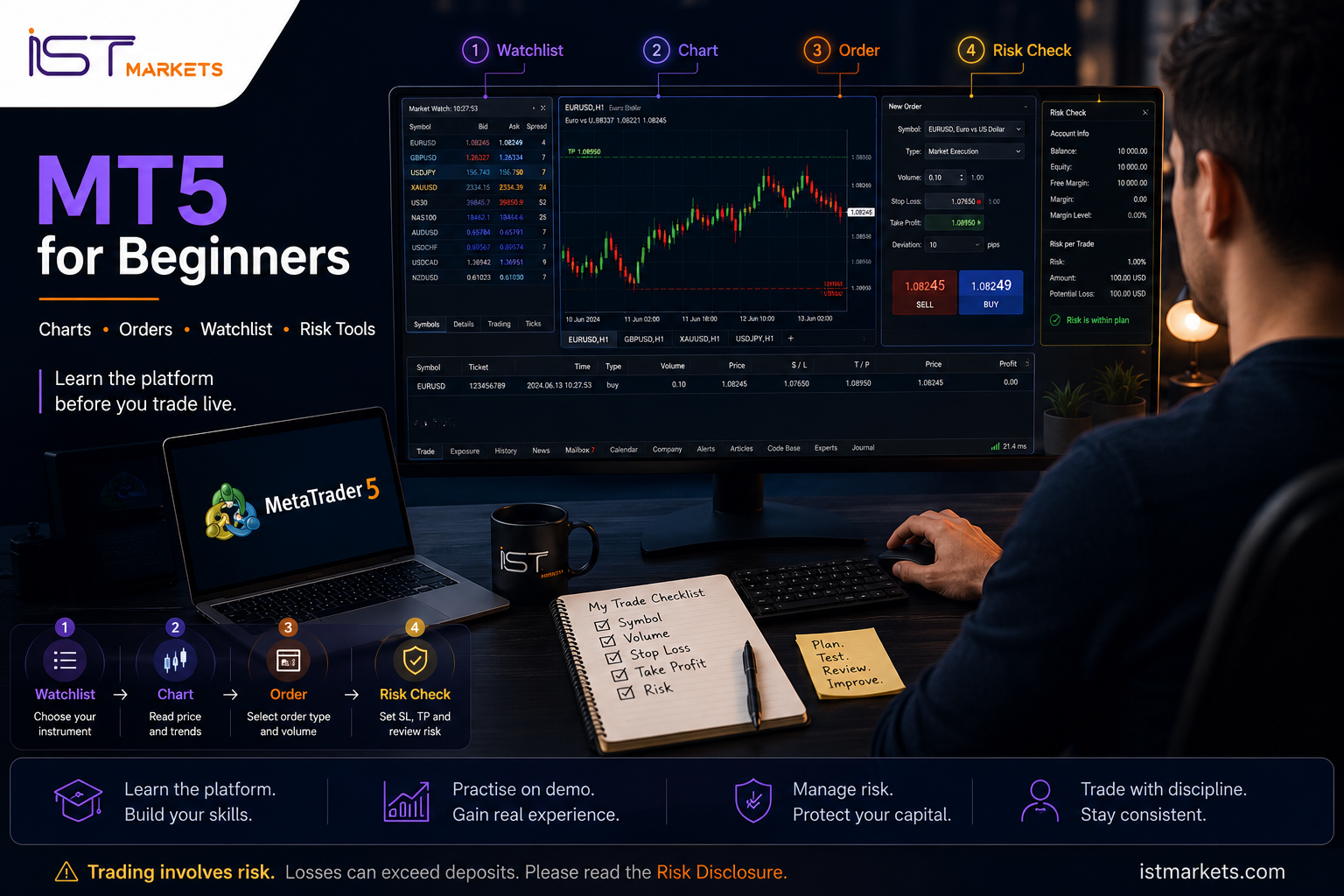
Think of MT5 as four practical zones:
MT5 feature glossary for beginners
| MT5 area | What it does | Beginner value | What to check before trading |
|---|---|---|---|
| Market Watch / Watchlist | Displays instruments, quote data and symbol access. | Helps you choose the correct instrument before opening a chart or order. | Symbol name, bid, ask, spread, session status and contract details if needed. |
| Chart Window | Shows price movement over a selected timeframe. | Helps you read trend, range, volatility and recent price behavior. | Symbol, timeframe, candle type, price scale and whether the chart is too cluttered. |
| New Order Window | Where trade instructions are prepared. | Forces you to review order type, volume, stop loss and take profit. | Symbol, volume, market/pending order, stop loss, take profit and comment. |
| Toolbox / Terminal | Shows positions, orders, account history, alerts and journal details. | Helps you monitor what is already active and avoid forgotten exposure. | Open position size, floating P/L, margin, order status and modification history. |
| Navigator | Accesses accounts, indicators, scripts, expert advisors and platform resources. | Useful after the basics are clear. | Do not run tools or robots you do not understand. |
| Timeframes | Changes how much time each bar or candlestick represents. | Helps you view the same market from short-term and broader contexts. | Avoid switching timeframes just to force a trade idea to look better. |
| Data Window / Crosshair | Shows exact price, time, candle and indicator values. | Useful for checking precise chart values instead of guessing visually. | Use it to measure levels carefully before placing demo orders. |
A clean beginner routine is simple: open Market Watch, select the symbol, open the chart, confirm the timeframe, check spread, open the order window, set risk controls, then place the order only if everything matches your plan. That sequence reduces mistakes more effectively than memorizing every button.
How to read a chart on MT5 without overcomplicating it
A beginner should not treat an MT5 chart as a prediction machine. A chart is a structured view of past and current price movement. It helps you ask better questions, but it does not tell you what will happen next with certainty.
MT5 charts can be displayed as bars, Japanese candlesticks or a line chart. MetaTrader documentation also notes that MT5 offers multiple chart timeframes, from one minute to one month, and that the timeframe represents the time interval of one bar or candlestick. This matters because a strong move on a one-minute chart may be only noise on a one-hour chart.
The beginner chart-reading sequence
What beginners should look at before indicators
| Chart element | Beginner question | Why it matters |
|---|---|---|
| Current price | Where is price now compared with recent movement? | Prevents trading from a random point on the chart. |
| Recent high and low | Where has price recently reacted? | Gives context for support, resistance and volatility. |
| Timeframe | Am I using this timeframe for entry, context, or review? | Prevents confusing short-term noise with broader structure. |
| Candle size | Are candles unusually large or fast? | Can signal volatility, news reaction or wider risk. |
| Spread | Is the bid/ask difference acceptable for my plan? | Spread affects the cost of entry and exit. |
| Open trades | Do I already have exposure on this symbol? | Prevents accidental overexposure. |
The most useful beginner chart is usually not the most decorated chart. It is the chart where you can clearly explain: what you are viewing, why you are watching it, where your risk would be, and what would make you stay out.
Market orders vs pending orders on MT5
One of the most important MT5 lessons is understanding what kind of instruction you are sending. MetaTrader documentation explains that an order is an instruction given to a broker to buy or sell a financial instrument, with two main order categories: market and pending. It also distinguishes orders, deals and positions, which is important because beginners often use those words as if they mean the same thing.
MT5 order types comparison
| Order type | What it means | When beginners encounter it | Key risk point |
|---|---|---|---|
| Market Buy | An instruction to buy at the current available market price. | When practising immediate entry. | Execution price can depend on market conditions and spread. |
| Market Sell | An instruction to sell at the current available market price. | When practising immediate entry. | Spread, volatility and slippage can affect the result. |
| Buy Limit | A pending buy order below the current price. | When practising a pullback entry idea. | Price may not reach the level, or may move through it quickly. |
| Sell Limit | A pending sell order above the current price. | When practising a sell-from-higher-price setup. | The market can continue beyond the chosen level. |
| Buy Stop | A pending buy order above the current price. | When practising breakout-style entry mechanics. | Breakouts can reverse quickly. |
| Sell Stop | A pending sell order below the current price. | When practising breakdown-style entry mechanics. | False breaks can trigger entries then reverse. |
| Stop Loss | A protective exit level linked to a position or order. | When defining where a trade idea is invalid. | It is a risk-control tool, not a guarantee against all loss. |
| Take Profit | A planned exit level if price reaches a selected target. | When planning the exit before emotion takes over. | It only works if market conditions allow execution at or around that level. |
For beginners, pending orders should not be treated as advanced magic. They are simply conditional instructions. A pending order can help you avoid chasing price, but it can also trigger when conditions are poor. That is why every order type should be practised on demo first, with a journal that records what happened after the order was placed.
How stop loss and take profit work on MT5
Stop loss and take profit are two of the most important fields in the MT5 order workflow. MetaTrader documentation describes Stop Loss as an order used to minimize losses if the security price moves in the wrong direction, and notes that Stop Loss and Take Profit activation results in closing the entire position. This is why beginners should think about exits before entries.
A stop loss should answer: “Where is this trade idea no longer valid?” A take profit should answer: “Where is the planned exit if the market moves in the intended direction?” Neither answer should be created after panic begins.
Stop loss vs take profit: beginner explanation
| Tool | Main purpose | Beginner mistake | Better habit |
|---|---|---|---|
| Stop Loss | Defines a planned exit if the market moves against the position. | Placing it randomly or deleting it after entry. | Set it from the trade idea and position size before confirming the order. |
| Take Profit | Defines a planned exit if price reaches a selected target. | Choosing a target only because it looks exciting. | Use a level that connects to market structure and the plan. |
| Volume | Controls exposure and how much price movement affects the account. | Using large lots because the demo balance feels big. | Use realistic demo sizing similar to what would be tolerable live. |
| Trailing Stop | Can move stop loss automatically after price moves in the trader’s favour. | Assuming it works even when the platform is unavailable. | Learn the conditions carefully before using it. |
Practical scenario: placing a demo order with stop loss and take profit
Imagine a beginner wants to practise MT5 order flow on demo. The goal is not to forecast the market or recommend buy/sell direction. The goal is to practise the sequence safely.
- They open Market Watch and select one instrument.
- They open the chart and confirm the symbol name.
- They choose a timeframe and look at recent price movement.
- They open the New Order window.
- They choose a small demo volume that reflects realistic practice.
- They decide whether they are practising a market order or a pending order.
- They enter a stop loss level based on where the demo trade idea would be invalid.
- They enter a take profit level based on the planned exit.
- They review symbol, volume, order type, stop loss and take profit before confirming.
- They monitor the demo position in the Toolbox and write down what they learned.
This is how MT5 becomes less intimidating: not by rushing, but by repeating a safe sequence until the order window feels familiar.
Risk tools beginners should use before placing MT5 orders
MT5 gives access to charts and order tools, but the most important risk work happens before the trade is sent. IST Markets’ own Trading Tools page connects MT5 access with tools such as calculators and charting utilities, and also reminds traders to review risk documents before trading. For beginners, this means the platform should be used as part of a decision process, not as a shortcut around risk.
The pre-order risk framework
| Risk checkpoint | Question to ask before placing an order | Why it matters |
|---|---|---|
| Symbol | Am I on the exact instrument I intended to trade? | Prevents trading the wrong market. |
| Session / market status | Is the market open and behaving normally? | Reduces surprises from inactive or thin conditions. |
| Spread | Is the spread unusually wide? | Wide spreads increase trading cost and can affect stop/entry planning. |
| Volume / lot size | How much exposure am I taking? | Position size controls how much a price move affects the account. |
| Margin | How much margin is required and what happens if price moves against me? | Leverage can magnify losses and create margin pressure. |
| Stop loss | Where is the idea invalid? | Turns risk into a planned number instead of a feeling. |
| Take profit | Where would I exit if the trade moves favourably? | Reduces emotional decision-making after entry. |
| News / volatility | Is there a major event that could change spreads or movement? | Helps avoid accidental exposure to conditions you do not understand. |
| Existing exposure | Do I already have trades in the same direction or correlated instruments? | Prevents stacking risk without noticing. |
| Platform confidence | Can I modify or close the position calmly if needed? | If not, practise longer on demo. |
Tools beginners should learn before advanced indicators
- Crosshair: helps check exact price and time values rather than guessing.
- Data Window: helps review bar details, values and indicator readings clearly.
- Trade tab: shows current positions and pending orders.
- History tab: helps review completed actions and build a trade journal.
- Alerts: can remind you of a level without keeping you glued to the chart.
- Margin calculator / position sizing tools: support planning, but do not remove risk.
Beginners often chase indicators because indicators feel like answers. In reality, the first skill is operational control: knowing what is open, how large it is, where the exit is, and how much risk is being taken.
A simple MT5 order workflow for anxious beginners
A strong MT5 platform guide should not only explain buttons. It should teach a repeatable workflow. This is especially important for traders who feel anxious about the interface. The goal is to reduce “platform panic” by making every step predictable.
The 10-click discipline rule
Before any real order, a beginner should be able to explain these ten checks without rushing:
- What symbol am I trading?
- What timeframe am I looking at?
- Am I viewing bid/ask and spread correctly?
- Is this a market order or pending order?
- What volume am I using?
- Where is the stop loss?
- Where is the take profit?
- What could make execution different from what I expect?
- Where will I monitor the position?
- What will I write in the journal after the trade?
On demo, this workflow should be repeated until it becomes boring. Boring is good at this stage. Boring means you are no longer emotionally surprised by the platform.
Common MT5 mistakes beginners make
Most beginner MT5 mistakes are not complicated technical failures. They are workflow failures made under pressure. A trader clicks too fast, uses the wrong volume, forgets the stop, changes timeframe until the trade looks better, or treats a demo win as proof of skill.
Common MT5 mistakes beginners make
| Mistake | Why it happens | What it can cause | Better habit |
|---|---|---|---|
| Trading the wrong symbol | Similar names, many instruments, rushed clicks. | Unexpected exposure and confusion. | Confirm the symbol before opening the order window. |
| Using the wrong volume | Lot size is misunderstood or copied from demo habits. | Risk becomes larger than intended. | Decide position size before clicking. |
| Ignoring spread | The trader watches the chart but not bid/ask cost. | Entry or stop placement may behave differently than expected. | Check spread in Market Watch before trading. |
| No stop loss | The trader focuses only on entry. | A small idea can become unmanaged risk. | Define invalidation before entry. |
| Deleting stop loss after entry | The trader does not want to accept a loss. | Planned risk becomes emotional risk. | Respect the original plan unless a written strategy says otherwise. |
| Overloading indicators | The trader thinks more tools create more certainty. | Decision fatigue and conflicting signals. | Keep the first chart layout simple. |
| Switching timeframes to justify a trade | The trader searches for confirmation after deciding. | Weak process and inconsistent entries. | Assign each timeframe a purpose before analysis. |
| Using One Click Trading too early | Speed feels professional. | Accidental orders and missed risk fields. | Master the order window first. |
| Not monitoring the Toolbox | The trader forgets active orders or positions. | Open exposure remains unmanaged. | Check Trade and History tabs regularly. |
| Treating demo profit as proof | Virtual money reduces pressure. | Overconfidence when moving live. | Use demo to practise process, not to validate guaranteed results. |
A good beginner does not need to be fast. A good beginner needs to be deliberate. In platform learning, accuracy comes before speed.
Can beginners use MT5 on mobile?
MT5 is available on mobile, and MetaQuotes states that the mobile application can be used on iPhone, iPad and Android-powered devices. The mobile version also supports trading operations, pending orders, protective Stop Loss and Take Profit levels, and One Click Trading. That convenience is useful, but beginners should treat mobile with extra caution.
Desktop vs mobile learning path
| Platform | Best beginner use | Watch out for |
|---|---|---|
| Desktop MT5 | Learning chart layout, order window fields, Toolbox and journal review. | Too many panels can distract if the workspace is not simplified. |
| Mobile MT5 | Monitoring positions, checking charts, practising simple order flow on demo. | Small screens and fast taps can increase accidental-click risk. |
| Web / browser access where available | Convenient access without a full desktop setup. | Feature availability may differ depending on broker setup and device. |
Mobile is helpful when used calmly. It becomes risky when used emotionally: checking every small move, closing too early, adding positions impulsively, or making decisions in a distracting environment.
MT5 beginner checklist
This checklist is designed to be practical. It is not a promise of readiness or future success. It simply helps you identify whether you understand the MT5 workflow well enough to keep practising, or whether you are still guessing.
MT5 beginner checklist
| Readiness item | What “ready to practise properly” looks like | Status |
|---|---|---|
| Watchlist control | I can find a symbol, view bid/ask and check spread. | Yes / No |
| Chart control | I can open a chart, change timeframe and keep the layout clean. | Yes / No |
| Order type knowledge | I understand market orders, limit orders and stop orders at a basic level. | Yes / No |
| Volume awareness | I know that volume affects risk and margin. | Yes / No |
| Stop loss planning | I can place or modify a stop loss on demo without confusion. | Yes / No |
| Take profit planning | I can set a planned exit without treating it as a guaranteed outcome. | Yes / No |
| Toolbox monitoring | I know where to see open positions, pending orders and trade history. | Yes / No |
| Spread and volatility awareness | I check conditions before orders, especially around news or fast movement. | Yes / No |
| Demo workflow | I have repeated the full order process on demo many times. | Yes / No |
| Journal habit | I record why I placed a demo order and what happened after. | Yes / No |
| Risk disclosure | I have reviewed the risk disclosure before considering live trading. | Yes / No |
Risk reminder before using MT5 live
MT5 is a platform, not a protection system. It can display charts, organize symbols, send orders, manage stop loss and take profit levels, and show account history. It cannot guarantee profit, prevent emotional decisions, remove leverage risk, or make volatile markets predictable.
IST Markets’ Risk Disclosure notes important risks connected to leveraged and off-exchange trading, including the possibility that stop-loss or stop-limit orders may not always be effective under hectic market conditions or technological limitations. It also highlights weekend risk, electronic trading risk, OTC/off-exchange risk and counterparty risk. Beginners should read those details before trading live.
Use MT5 on demo first. Learn how the order window behaves. Learn where open positions appear. Learn how to close or modify orders. Learn how margin and position size affect exposure. Then, if you ever choose to move live, start gradually and only with capital you can afford to lose.
Explore MT5, then practise on demo first
If you are new to MetaTrader 5, start with the platform sequence before the trading decision: watchlist, chart, order window, stop loss, take profit and position monitoring. Once the workflow is clear, use demo practice to repeat the process without real-money pressure.
With IST Markets, you can explore available trading tools and practise on a demo trading account before deciding whether a live account is appropriate for your experience and risk tolerance.
FAQ
Explore MT5, Then Practise on Demo First
Learn the watchlist, charts, order window, Stop Loss, Take Profit and position monitoring before using real funds.
Explore MT5 Tools
Try MT5 on Demo First
Demo practice does not guarantee future live results. Forex and CFD trading involves risk.
Sources & Further Reading
- MetaTrader 5 Help — Market Watch
- MetaTrader 5 Help — View and Configure Charts
- MetaTrader 5 Help — Basic Trading Principles, Orders, Stop Loss and Take Profit
- MetaTrader 5 Help — User Interface
- MetaQuotes — MetaTrader 5 Mobile Trading
- IST Markets — Trading Tools
- IST Markets — Demo Trading Account
- IST Markets — Risk Disclosure
- IST Markets — Legal Documents